A reference image, a camera frame and a replacement image. The BCV final project is to find the first image in the frame and put the replacement in the same position. I tested the code on generated scenes, then on the marker displayed on a phone in front of the integrated webcam.
The matching pipeline Link to heading
SIFT is the default, with ORB available in the GUI. Both use brute-force kNN matching with two neighbours. A ratio test removes ambiguous matches, and RANSAC estimates the homography from the remaining pairs.
Not every returned homography is useful. The program also checks the inlier count, inlier ratio, spread of reference points and projected outline. If those checks fail, it leaves the current frame unchanged. Otherwise, warpPerspective transforms the replacement and a mask limits blending to the marker area.
The main defaults are 1800 features, a 3-pixel RANSAC threshold and at least 10 inliers. The ratio threshold is 0.72 for SIFT and 0.78 in the ORB benchmark. These values are adjustable rather than hidden in the code.
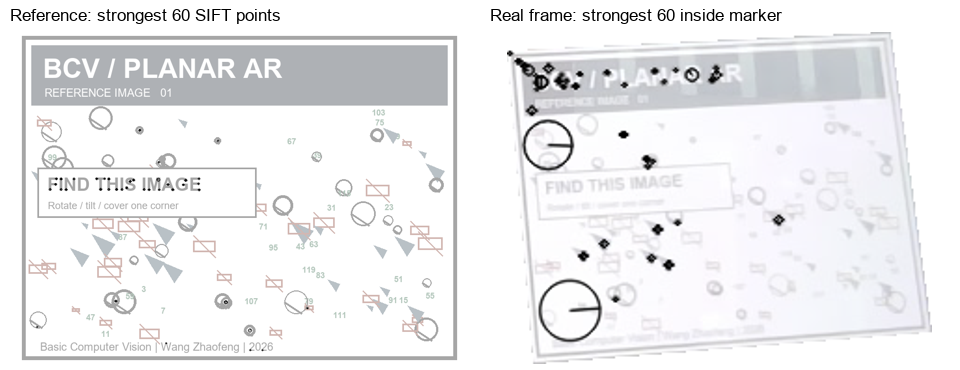
drawKeypoints with DRAW_RICH_KEYPOINTS shows the patch scale and dominant orientation. This figure displays the strongest 60 points on each image; detection uses a feature budget of 1800.
Checking the parameters Link to heading
The defaults started as practical choices. A later sensitivity study varied one parameter at a time, using two additional synthetic seeds. Each setting had 18 detailed-marker positives, 18 low-detail positives and four absence trials per method. The negatives use two backgrounds paired with both references. In total: 1920 parameter evaluations with cached descriptors.
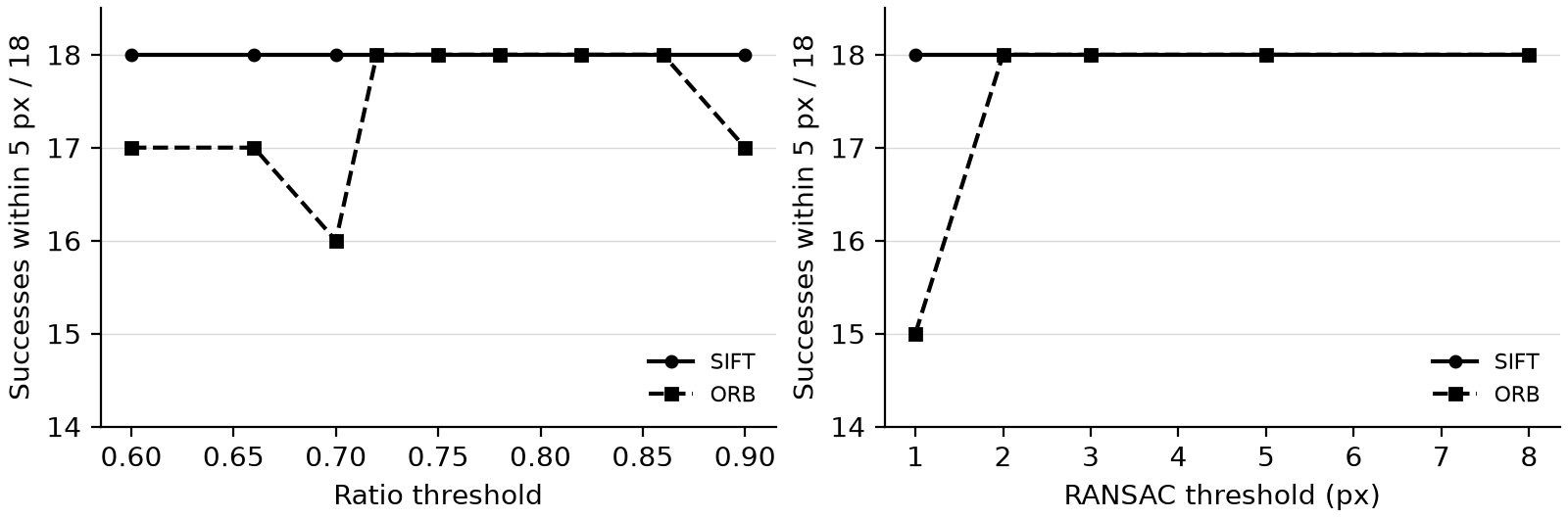
SIFT passed all 18 detailed-marker cases throughout the scan. ORB passed 18/18 for ratios 0.72-0.86, but only 16-17/18 at the stricter tested values or at 0.90. A 1-pixel RANSAC threshold reduced ORB to 15/18; 2-8 pixels all passed. The original ratios and 3-pixel threshold sit inside these stable ranges. The experiment doesn’t show a unique optimum or prove that SIFT and ORB need different ratio thresholds.
Ten inliers provides redundancy beyond the four-pair minimum for a homography. Requiring reference-point coverage avoids trusting a tiny cluster. Scanning 4-20 inliers and 0-10% coverage made no difference on this small set. All low-detail and absence trials were rejected at every setting, so this study cannot show which guard reduces false detections. The original defaults are retained.
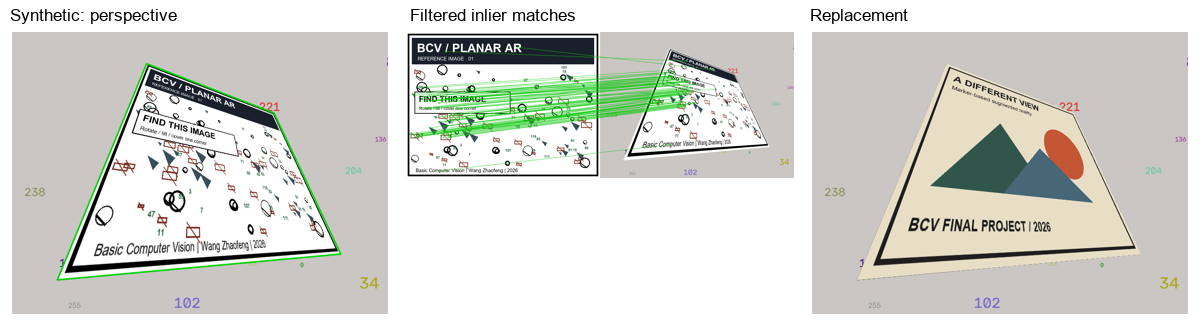
Synthetic perspective test. The target quadrilateral is known, so the four estimated corners can be checked directly.
What the synthetic tests show Link to heading
Two marker types, two descriptors, ten conditions and three small geometric perturbations per condition: 2 x 2 x 10 x 3 = 120 runs. There are nine positive conditions and one absence condition. The images are 800 by 600. A positive case passes when alignment is accepted and mean corner error is at most 5 pixels.
Both methods pass all 27 positive cases for the detailed marker. A plain grey rectangle passes none for either method. No false detections in the 12 marker-absent cases. That is a small set, and the exact reference artwork is reused to construct every positive scene.
The strong perspective case separates the estimates more clearly: mean corner error is about 0.49 pixels for SIFT and 3.50 pixels for ORB. Both still pass the chosen limit. Processing times are in the CSV files; they exclude diagnostic drawing and display, so they are not live-camera FPS.
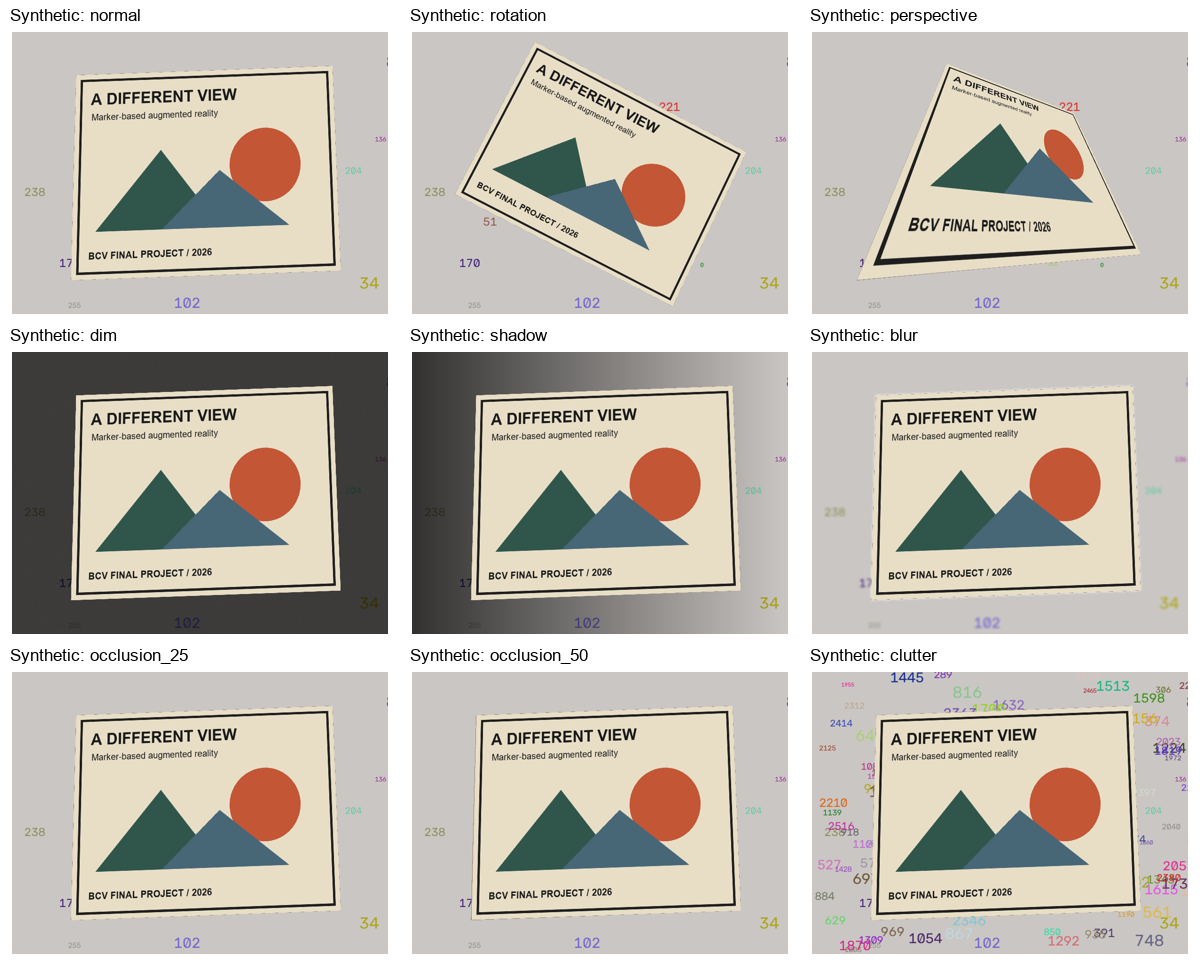
The 25% and 50% occlusions hide part of the reference image in its own plane. They test whether enough features remain for detection. The rendered replacement still covers the full estimated rectangle, including the occluded area. There is no foreground-hand model.
A phone in front of the webcam Link to heading
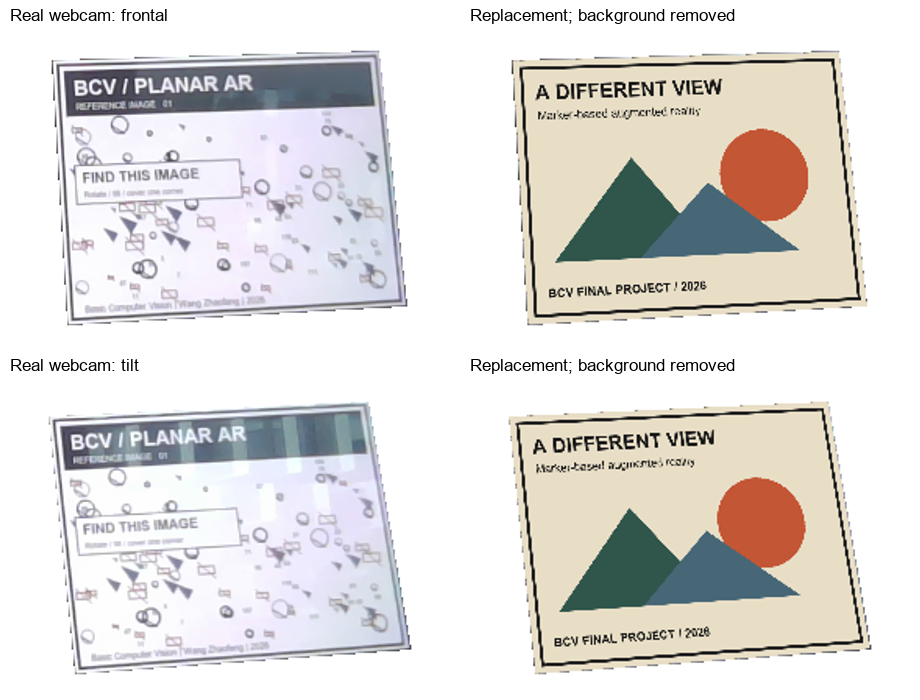
The first frontal run accepted all 203 frames over 12.5 seconds. That was encouraging, but a longer guided sequence exposed more failures. Tilt, rotation, reduced screen brightness, partial covering and a different background. The final step was to remove the phone.
For a fairer descriptor comparison, both methods processed the same MJPG-decoded frames, sampled every fourth frame. Capture rates varied during the timed stages, which explains their different frame counts. The counts below mean that alignment passed the checks; they are not measured detection accuracy.
| Guided condition | SIFT accepted | ORB accepted |
|---|---|---|
| Frontal | 23/23 | 22/23 |
| Tilt | 20/22 | 14/22 |
| Rotation | 21/23 | 8/23 |
| Dim screen | 3/29 | 0/29 |
| Partial cover, first step | 14/26 | 0/26 |
| Partial cover, second step | 23/23 | 0/23 |
| Changed background | 19/24 | 3/24 |
| Phone absent, reviewed segment | 0/21 | 0/21 |
SIFT held up better in this recording. ORB was faster in this replay: condition medians were roughly 31-62 ms per sampled frame, compared with about 80-159 ms for SIFT. These are single-pass measurements, excluding drawing and display; they aren’t a controlled speed benchmark.
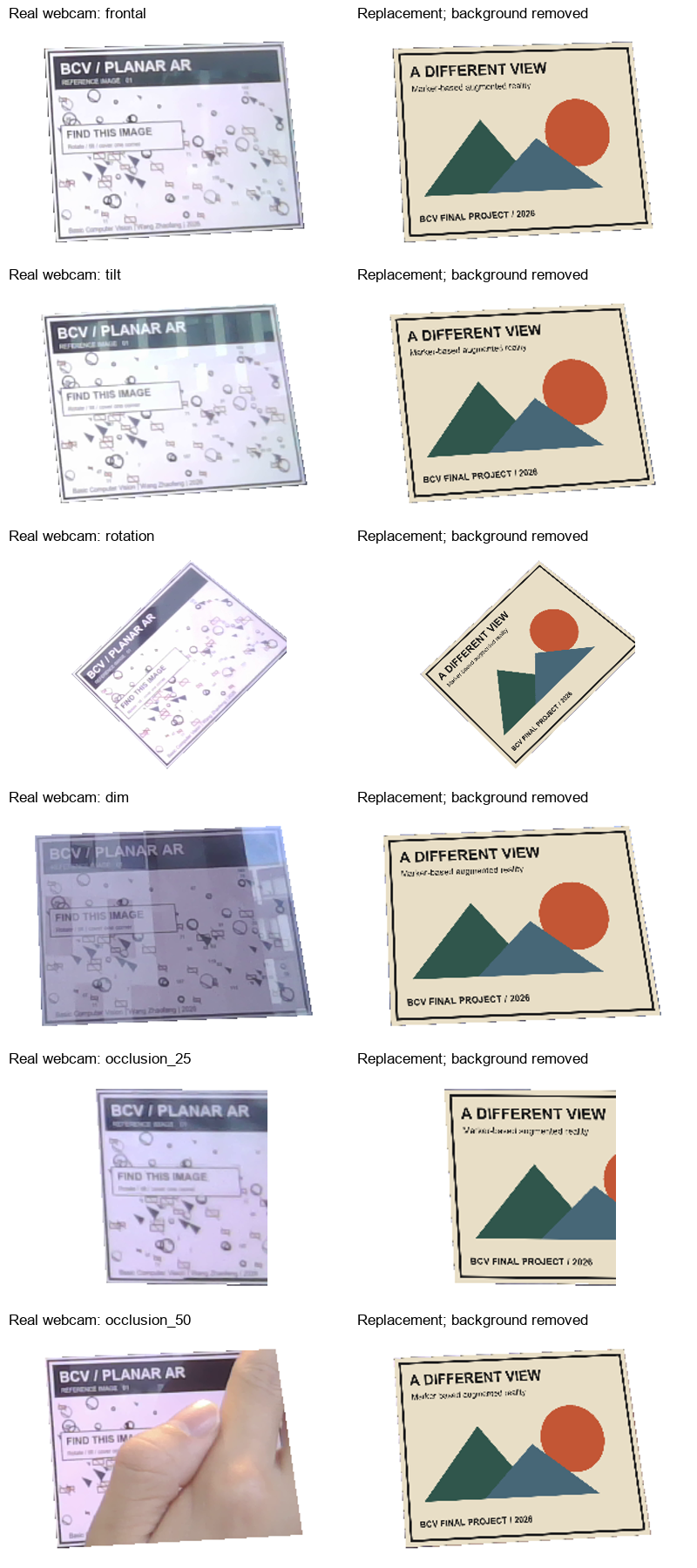
Dimming was the clearest failure. The two covering steps aren’t a controlled comparison of percentages: hand position, distance and focus also changed. The better second result doesn’t mean that more occlusion helps.
The replay diagnostics explain the immediate failure more clearly. SIFT’s median filtered matches fell from 111 in the frontal stage to 10 in the dim stage, and its median inliers fell from 100 to four. Of the 26 dim rejections, 14 lacked enough filtered matches and 12 lacked enough RANSAC inliers. ORB still detected about 1772 keypoints in the dim frames, including background points, but its median inlier count was also four.
Under rotation, ORB kept only five median inliers, compared with 35 for SIFT. In cover step 2 the counts were five and 32. SIFT’s normalized gradient patches and ORB’s steered binary tests respond differently to appearance changes. Here the measured bottleneck is consistent matching, not simply the number of detected points. This recording doesn’t isolate rotation estimation, blur, reflection or viewpoint as a single cause. The SIFT and ORB tutorials describe those representations.
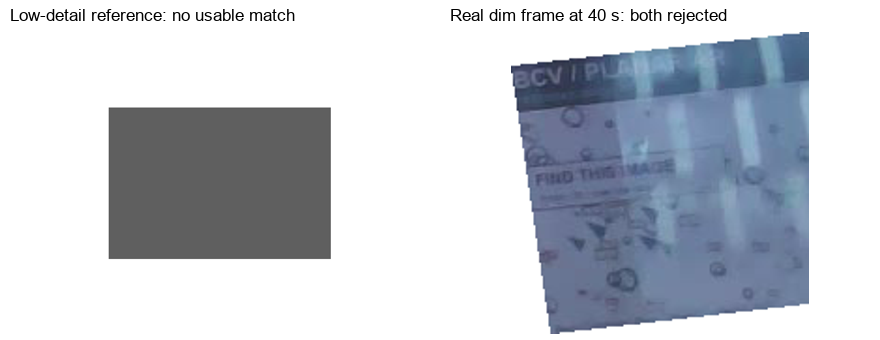
The generated scenes reuse the exact reference pixels. They don’t include the phone screen’s reflections, changing focus or handheld motion. That helps explain why synthetic dimming and occlusion were much easier than the real recording.
The nominal absence step initially still contained the phone moving away. I checked that transition before treating it as a negative test. The later, reviewed no-phone segment is counted separately in the result files. Raw frames and the room background stay local. The earlier examples retain the estimated marker region; the new diagnostic images use manually bounded artwork crops. Example snapshots were selected for visible matches, while the table includes every sampled frame.
A small corner check Link to heading
Five times were selected before viewing the estimates: 8, 11, 18, 21 and 29 seconds. Two frames had artwork corners outside the image and were excluded. For the other three, the assistant independently read the four outer artwork corners from enlarged pixel grids. The annotations bound the image itself, not the phone bezel.
| Requested time | SIFT mean / maximum corner error | ORB mean / maximum corner error |
|---|---|---|
| 8 s | 1.51 / 2.23 px | 2.66 / 6.10 px |
| 11 s | 0.83 / 1.39 px | 2.53 / 4.31 px |
| 18 s | 1.65 / 3.10 px | 2.14 / 3.16 px |
Mean distance over all 12 corners: 1.33 px for SIFT and 2.44 px for ORB. The visual annotations have roughly 2 px uncertainty. This is an approximate check on three easy views, not a precise method ranking or an accuracy score for the whole video. The bundle includes the coordinates and individual errors.
The interface Link to heading
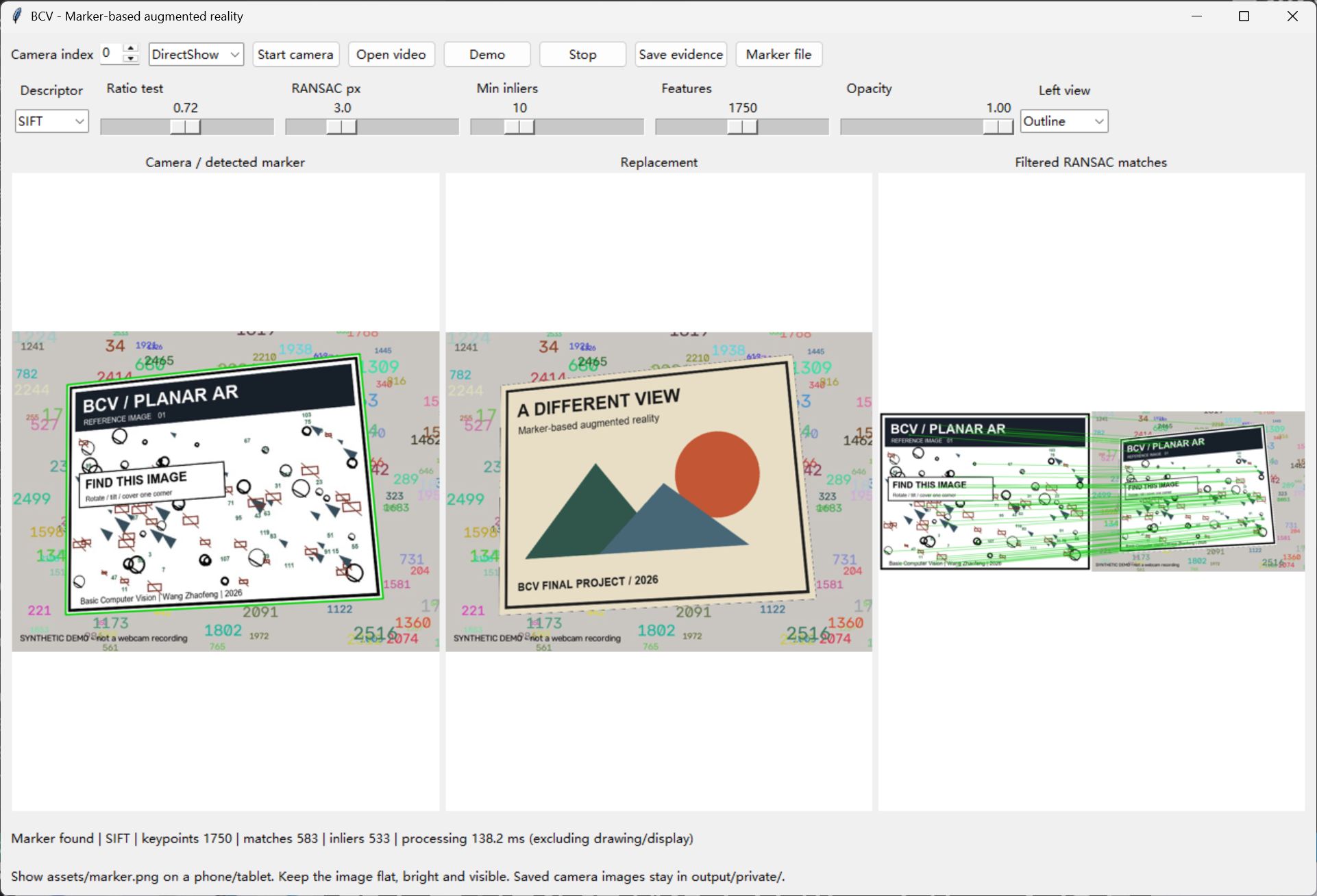
The interface accepts a camera or video file. It shows the outline or keypoints, the replacement and the filtered matches. Capture runs in a separate process, which makes a stalled virtual camera easier to stop.
This earlier screenshot shows the generated demo; the phone examples above are the real camera test. Its old slider rounded the feature budget to 1750. The current slider uses steps of 100 and supports 1800, which is the setting used by all reported evaluations. The interface and test recorder use the same matching code.
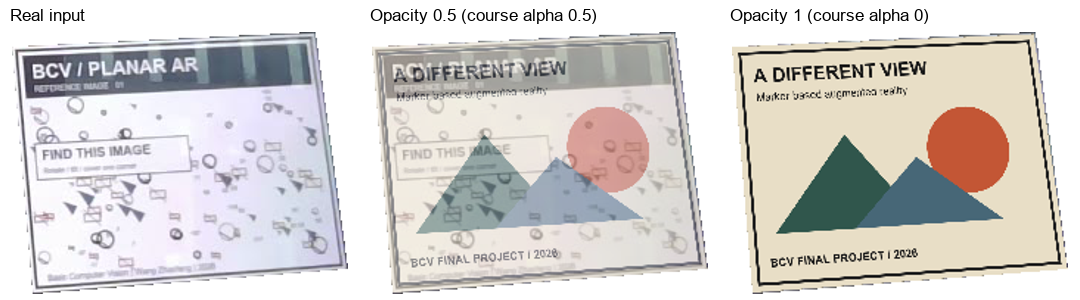
The course blending formula is fusion = (1-alpha)*H(source) + alpha*target. The GUI’s opacity is the substitute weight, so opacity = 1-alpha. Opacity 1 fully replaces the marker; 0.5 leaves equal contributions from both images. The mask leaves the surrounding frame unchanged.
There is no temporal tracking or smoothing. A bad frame simply loses its overlay, and a foreground hand is covered by the replacement. Low light, reflections and blurred or small markers remain the main limits of this version.