The lab asks us to build a chat character in Unity, then study how people experience the interaction. I replaced the local LLMUnity model with the DeepSeek API to avoid downloading and running a model on this PC. The chat still streams its answer and locks the input until the reply finishes.
This changes the lab’s offline setup: internet access and API credit are required, and the measured delay includes the network and provider. It is an API-based adaptation. The course deck specifies Unity 6 with URP; this UI-only project uses Unity 6000.0.23f1, the Built-in Render Pipeline and TextMeshPro. Acceptance of these changes is for the instructor to confirm.
From the input field to a streamed answer Link to heading
Unity sends the conversation to a Python relay on 127.0.0.1. The relay holds the API key in memory and makes the HTTPS request to DeepSeek. The key never enters the Unity scene, source archive or study CSVs.
The relay uses deepseek-flash, with thinking disabled and a 256-token output limit. A fixed system prompt asks for a natural reply in one to three sentences without emojis. These settings follow the DeepSeek API documentation and its streaming response format.
NPCController adds each answer delta to the chat log and scrolls to the bottom. The stream decoder preserves UTF-8 characters across network packets and waits for a complete SSE event before parsing JSON. Role events and reasoning text do not start the visible-answer timer.
Input and condition controls stay locked while a request is running. A failed or incomplete stream unlocks the controls, records an error, and keeps that unfinished exchange out of the model’s conversation history. Successful conversations retain up to ten previous turns.
Two interface conditions Link to heading
The first exercise measures latency. The second changes the waiting feedback:
- A: streamed replies, with no waiting text.
- B: the same interface, with “AI is typing…” until the first visible answer text arrives.
Both conditions use the same model, prompt, input lock and output limit. The indicator does not add an artificial delay.
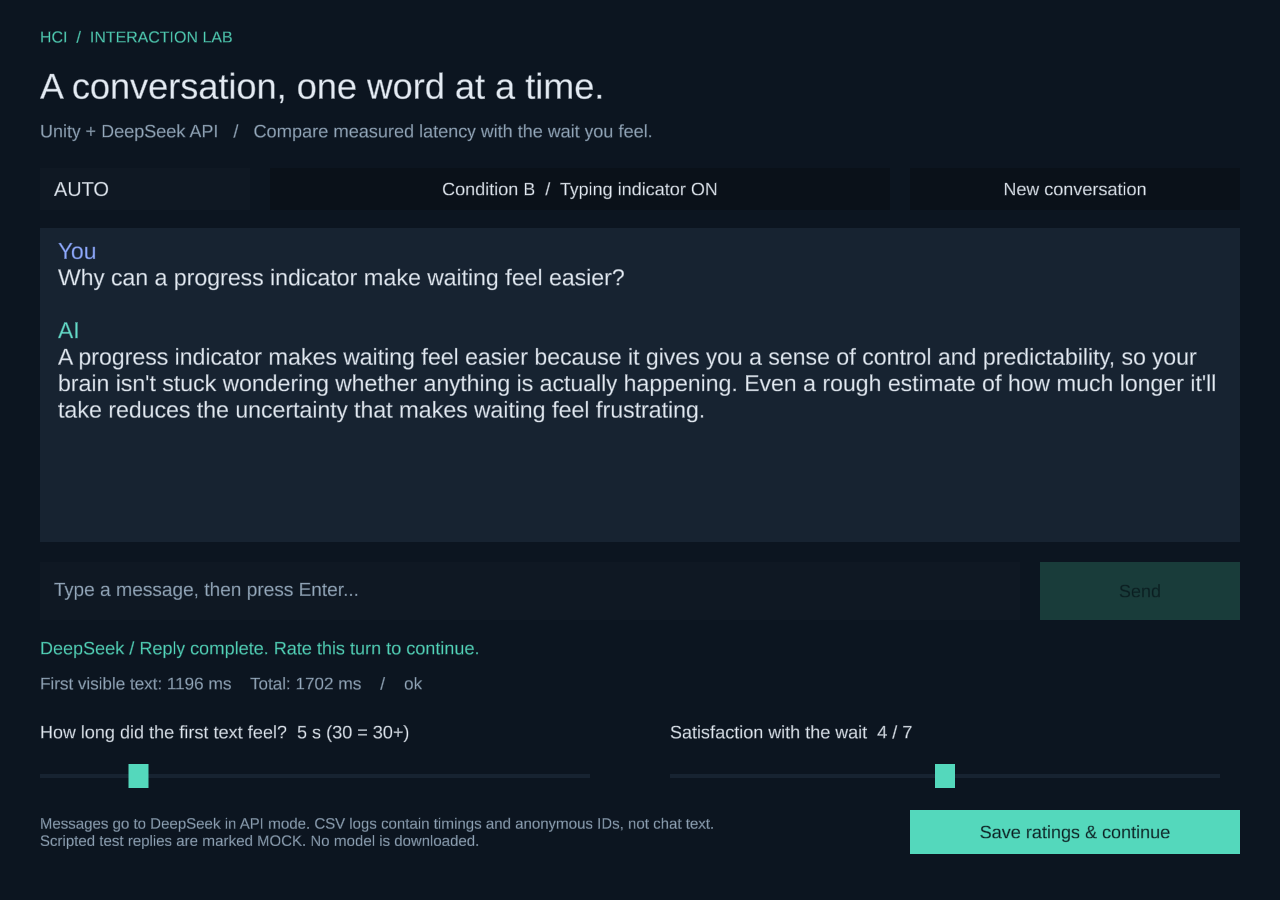
A runtime render from the actual Windows application. AUTO identifies an automated technical check. The sliders show their initial values; no human ratings were collected in this run.
What was verified Link to heading
The Windows build passed stream-parser checks and an offline runtime smoke test covering both conditions, input locking, ratings-file output, conversation history, long-chat scrolling and recovery after an intentional connection failure. The scripted relay labels its replies MOCK. Those timings and synthetic ratings are kept separate from API measurements.
The live check sends three fixed HCI prompts in A, then the same three in B, with a fresh conversation before every request. These are automated requests from Unity through the relay to DeepSeek. Each successful response must include visible content, an accepted finish reason, and the final stream marker.
| Measure | A | B |
|---|---|---|
| Successful requests | 3 | 3 |
| Median first text | 1.480 s | 1.666 s |
| Median total | 2.038 s | 2.185 s |
First-text times ranged from 1.131 to 1.720 seconds in A, and 1.196 to 3.649 seconds in B.
Time to first text is measured from Send until Unity receives and processes the first non-empty answer-content delta. Total time ends when the stream/network request completes. Both use Unity’s unscaled, double-precision realtime clock. This is client-visible latency, not isolated model inference time.
The two blocks are sequential and contain only three requests each. Network conditions, service load, caching and answer length can change the timings. These numbers verify that the measurement path works; they do not show that a typing indicator makes the API faster or improves satisfaction.
Participant use and feedback Link to heading
After each successful turn, the interactive app asks for perceived first-text wait and satisfaction with waiting. Saving the ratings unlocks the next turn. Timings and ratings are stored in separate CSVs joined by session and turn ID, without chat text.
An informal follow-up on 16 October produced three completed real-API turns and three matching ratings, all in B with the typing indicator enabled. Multiple participants shared the default P01 code. The logs therefore identify three rated turns, not three distinct people. They do not establish the exact participant count or which person gave each rating.
| Turn | First text (s) | Total (s) |
|---|---|---|
| 1 | 1.026 | 1.311 |
| 2 | 0.862 | 1.075 |
| 3 | 0.936 | 1.287 |
| Turn | Felt wait (s) | Satisfaction (1-7) |
|---|---|---|
| 1 | 4 | 7 |
| 2 | 10 | 6 |
| 3 | 5 | 1 |
Across these three turns, median time to first text was 0.936 seconds, median total time was 1.287 seconds, and median reported first-text wait was 5 seconds. Satisfaction scores were 7, 6 and 1, with a median of 6/7. These are turn-level summaries. The shared code prevents a reliable per-person summary, and repeated ratings may come from the same person.
The estimates of waiting were longer than the measured first-text delays in every turn. The third turn also received 1/7 for satisfaction despite first text arriving in under a second. There are no written explanations alongside the ratings, so the records do not explain the mismatch or the low score. The next interview should clarify what people counted as waiting and why they chose their score.
This adds real usage feedback to the technical checks, but it is not a completed A/B comparison. There are no participant turns in A, no recorded condition-order comparison, and no written preference comments. The automated A/B timings above cannot serve as a human control group or show that the indicator improved satisfaction.
For the next round, assign a separate code to each person, collect both A and B for each person, alternate condition order, and save a brief comment with each rating. The original five-classmate plan remains a proposal. Five is not a requirement for these two exercises; the separate usability-study option is the one that explicitly specifies five participants and SUS.
The slide 24 notes ask each group to choose two exercises and present what changed, how it was measured, and what users said in the next session. They do not give a calendar deadline or submission format.
- Download the Unity source, local relay and study plan
- Download the technical verification summary
- Download the six automated API timing records
- Download the participant pilot summary without session IDs or timestamps
To run the project, start the relay and enter a key at its hidden prompt, then open the included Unity scene and press Play. The README has the build and analysis commands. The source download contains no API key or local model.